
How to Login to JobOoro.com: A Complete Guide for Job Seekers and Employers in Kenya
Author: Stephen Magero
Published on: 20 November 2026
last reviewed: 20 November 2026
Accessing your JobOoro account allows you to use the platform's account-based services for job searching and recruitment. Whether you are looking for employment opportunities in Kenya or representing an organisation that wants to advertise vacancies, understanding how to access the correct account is an important part of using the platform.
JobOoro provides separate registration options for job seekers and employers. Both user groups access their accounts through the same login page, where they select the account type associated with their registration.
This guide explains how to log in to JobOoro, register a new account, use the available account services, resolve common login difficulties and protect your account information.
1. Understanding the JobOoro Login System
JobOoro is an online employment platform where job seekers can explore vacancies submitted by employers and employers can advertise employment opportunities.
The platform has two main account categories.
Job seeker accounts
A job seeker account is intended for individuals looking for employment opportunities. It provides access to the job seeker registration and login facilities and the account-based services available to registered job seekers.
Job seekers can explore publicly available vacancies on JobOoro. Each listing provides information such as the job title, employer, location, qualifications, application instructions and, where provided, the closing date.
Employer accounts
An employer account is intended for organisations and authorised representatives who want to advertise vacancies and manage recruitment-related activities.
The employer registration process requests organisation and account information. The available employer facilities include submitting and managing job listings and accessing relevant recruitment services.
Why choosing the correct account type matters
The login page includes an account-type selector. You should choose the same account category you selected when registering.
For example, someone who created a job seeker account should select the job seeker option rather than the employer option. Selecting the wrong category may prevent you from accessing the expected account area.
2. How to Login to JobOoro.com Step by Step
If you already have a registered account, follow these steps.
Step 1: Visit the official JobOoro website
Open a browser on your computer, smartphone or tablet.
Visit:
Check the website address carefully before entering your login details. Make sure you are using the official JobOoro domain rather than an unfamiliar website that imitates it.
Step 2: Open the login page
From the JobOoro website, locate the Sign In option in the navigation menu.
Select it to open the login page.
You can also access the login page directly:
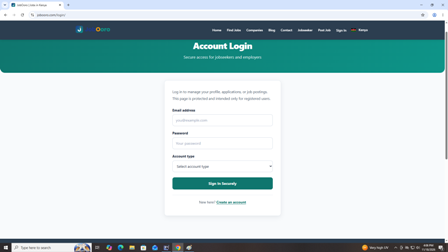
Step 3: Enter your registered email address
The login form requests the email address associated with your account.
Enter the address you used when registering.
If you have several email accounts, check that you are using the correct one. An email address that is different from the one associated with your registration may not identify your account.
Step 4: Enter your password
Type the password associated with your JobOoro account.
Check for accidental spaces, spelling errors and incorrect uppercase or lowercase characters. If your device automatically fills in a password, make sure it has not inserted outdated credentials.
Do not share your password with anyone claiming to offer employment or account assistance.
Step 5: Select your account type
Choose the account category associated with your registration:
- Job Seeker: For individuals registered to explore and apply for employment opportunities.
- Employer: For organisations and representatives registered to advertise vacancies and use employer services.
If you are unsure which option you selected during registration, check your original registration information.
Step 6: Submit your login details
Review the information you entered and select Sign In Securely.
If the credentials and account type are correct, the platform should direct you to the relevant account area.
If access is unsuccessful, check your email address, password and account selection before trying again.
3. How to Login to JobOoro Using a Mobile Phone
You can access JobOoro using a smartphone or tablet with an internet connection. A desktop computer is not required to open the website or use the login form.
Follow these steps:
- Open Chrome, Safari or another updated mobile browser.
- Enter www.jobooro.com in the address bar.
- Wait for the homepage to load.
- Select Sign In from the navigation menu.
- Enter your registered email address.
- Enter your password.
- Select your account type.
- Submit the login form.
If the navigation menu is collapsed on your phone, open the menu to locate the Sign In option.
If the page does not load correctly, check your internet connection, refresh the page or try another browser.
For security, avoid saving your password on a device that other people regularly use.
4. How to Register for a JobOoro Account
You must register before accessing services that require a JobOoro account.
The platform provides separate registration pages for job seekers and employers. Choose the appropriate page for your needs.
How to register as a job seeker
If you are looking for employment, visit the job seeker registration page:
The registration form requests information including:
- Username.
- First name and last name.
- Email address.
- Phone number.
- Country and city.
- Personal profile information.
- CV upload.
- Profile photo.
- Password and password confirmation.
Complete the fields requested by the registration form.
Use an email address that you can access because it may be needed for account-related communication. Ensure that the information in your profile and CV is accurate and reflects your actual qualifications and experience.
Before submitting the form, review your details and check that the documents you upload are the correct files.
How to register as an employer
If you represent an organisation that wants to advertise vacancies, visit:
The employer registration form requests information such as:
- Company name.
- Email address.
- Phone number.
- Country.
- City.
- Password and password confirmation.
Provide accurate information that represents your organisation.
Read the applicable terms and privacy information before submitting your registration.
Once registration is complete, use the employer account option on the login page when accessing your account.
5. What Can You Do After Logging In?
The facilities available to you depend on your account type and the services currently enabled on JobOoro.
Services for job seekers
Job seekers can use JobOoro to explore employment opportunities and access the facilities provided for registered users.
Typical activities include:
Exploring vacancies
Browse available job listings and examine the job title, employer information, location, qualifications, responsibilities and application instructions.
Preparing to apply
Compare vacancy requirements with your education, experience and skills. Follow the application instructions provided in the individual listing.
Maintaining account information
Keep your profile information accurate and up to date. Where profile-management facilities are available, use them to maintain relevant personal and professional details.
Accessing application-related services
Use the application facilities available through your account where supported. The application method and any additional requirements may differ between vacancies.
An important distinction is that JobOoro's homepage explains that saved jobs are stored in the browser on the device being used. They should not be assumed to synchronise automatically between different devices or accounts.
Services for employers
Employer accounts provide access to recruitment-related facilities.
Depending on the services enabled for the account, employers can use the platform to:
Submit job vacancies
Provide the job title, responsibilities, qualifications, location, application instructions and other relevant vacancy information.
Manage job listings
Access the available facilities for managing submitted vacancies and maintaining listing information.
Maintain company details
Keep organisation information accurate and consistent with the employer being represented.
Manage recruitment activities
Use the available employer facilities to handle recruitment-related information and applications.
Employers should ensure that every vacancy contains accurate information, realistic requirements and a working application method.
6. What to Do If You Forget Your JobOoro Password
Forgetting your password can prevent you from accessing your account.
If you cannot remember your password, first visit the official login page:
Check whether the password recovery option is available and working.
Important account-support information: At the time this guide was reviewed, the password-recovery link displayed on the job seeker registration page led to a page-not-found error. Therefore, do not assume that the online password-reset process is currently available.
If you cannot reset your password:
- Visit the official JobOoro Contact page.
- Explain that you cannot access your account.
- Provide the email address associated with your registration, if requested.
- Include the error message or describe what happens when you try to log in.
- Follow the instructions provided by the support team.
You can also contact JobOoro through its published support email address: support@jobooro.com.
Never include your existing password in a support request. Do not share verification codes or other confidential account information with an unverified person.
7. Common JobOoro Login Problems and How to Resolve Them
Login difficulties can result from incorrect credentials, account-selection errors, browser problems or temporary website issues.
The following suggestions can help you identify the cause.
Problem 1: Incorrect email address or password
If your login attempt is unsuccessful, check:
- Whether you entered the email address used during registration.
- Whether your password is correct.
- Whether Caps Lock is affecting your password.
- Whether your browser has inserted an old saved password.
- Whether you selected the correct account type.
Correct any mistakes and try again.
If you cannot remember your password, consult the account-support instructions above.
Problem 2: Unable to find your account
If the platform does not recognise your login details, consider these possibilities:
- You entered a different email address from the one used during registration.
- You selected the wrong account type.
- Your registration was not completed successfully.
- You have not yet created an account.
If the issue continues, contact JobOoro support through the official contact page.
Problem 3: Login page is not loading
A login page may occasionally fail to load because of an internet connection, browser or temporary website problem.
Try the following:
- Check that your internet connection is working.
- Refresh the login page.
- Open JobOoro in another browser.
- Update your browser if necessary.
- Try again after a short period if the website is temporarily unavailable.
Avoid entering your credentials into unofficial websites that claim to provide an alternative login service.
Problem 4: Unexpected redirects or access problems
If you are redirected to an unexpected page or cannot reach the intended account area:
- Return to the official JobOoro homepage.
- Open the login page again.
- Confirm your selected account type.
- Check that your browser allows necessary website cookies.
- Try another updated browser if the issue persists.
When contacting support, describe the page you were trying to access and what happened after submitting the login form.
Problem 5: Registration problems
If you cannot create an account, check that:
- All required fields have been completed.
- Your email address is entered correctly.
- Your password and password confirmation match.
- Uploaded documents meet the form's stated file requirements.
- Your internet connection is stable.
If the registration form continues to fail, contact JobOoro support and explain the problem.
8. How to Keep Your JobOoro Account Secure
Your account may contain personal, professional or recruitment-related information. Protecting your credentials is therefore important.
Use a strong password
Choose a password that is difficult for other people to guess. Avoid obvious information such as your name, birth date or telephone number.
Where possible, use a unique password that you do not reuse on other websites.
Keep your password private
Do not share your password with strangers, recruiters or people claiming they can guarantee employment.
Job applications should not require you to disclose your account password.
Access the official website
Use the official JobOoro website:
Check the domain before entering your credentials, especially when following links received through email or messaging applications.
Be careful with shared devices
If you use a public computer or another person's device, avoid saving your password.
Log out when you finish and close the browser window.
Protect your registered email account
Your email account may be used for important account-related communication. Use a strong password and protect access to it.
Watch out for suspicious messages
Be cautious of messages requesting your password, payment or confidential verification information.
If a message claims to come from JobOoro but appears suspicious, contact the platform through its official contact details before responding.
9. Do You Need an Account to Browse Jobs on JobOoro?
You can explore publicly available job listings on JobOoro without first logging in.
The website provides access to vacancy information, including job titles, employer details, locations and application instructions.
However, certain services require registration or account access.
For example, if a vacancy or platform service directs you to sign in before completing an action, follow the instructions provided on the relevant page.
Before applying, read the full vacancy description and confirm:
- The minimum educational requirements.
- The experience required.
- The job location.
- The application method.
- The closing date.
- Any additional documents requested by the employer.
Remember that a vacancy appearing on JobOoro does not guarantee that the employer or every detail has been independently verified. Job seekers should confirm important information before sharing sensitive documents.
10. Frequently Asked Questions About JobOoro Login
1. Is registering as a job seeker free?
JobOoro provides a job seeker registration facility. Check the registration page and applicable terms for the current conditions of using the service.
2. Can job seekers and employers use the same login page?
Yes. Both categories use the JobOoro login page. The account-type selector allows users to choose the category associated with their registration.
3. Can I access JobOoro using my smartphone?
Yes. You can open JobOoro through a mobile browser and use the login page from a smartphone or tablet.
4. What should I do if I enter the wrong password?
Check that you entered the correct registered email address and password. If you cannot remember your password, consult the available recovery options or contact JobOoro support.
5. Can I register as a job seeker without work experience?
Yes. The job seeker registration page is available to people looking for employment. Whether you qualify for a particular vacancy depends on the requirements specified by the employer.
6. Do I need an account to browse vacancies?
No. Publicly available vacancies can be explored on JobOoro without first logging in. Some account-based services may require registration.
7. Can employers create accounts on JobOoro?
Yes. Organisations can use the employer registration page to create an employer account and access the available recruitment services.
8. What should I do if I cannot reset my password?
If the password recovery option is unavailable or does not work, contact JobOoro through its official contact page or support email. Never send your existing password.
9. Where can I get help with JobOoro account problems?
Visit the JobOoro Contact page or email support@jobooro.com. Describe the problem and include relevant error messages, but never include your password.
Conclusion
Logging in to JobOoro is an important step towards accessing the platform's job-search and recruitment services.
Job seekers should use the job seeker account option, while employers should select the employer option associated with their registration. Both groups can access the same login page, but their account purposes and available facilities differ.
If you are new to JobOoro, begin by choosing the appropriate registration page. If you already have an account, visit the official login page and enter your registered credentials.
Keep your account information accurate, protect your password and follow the instructions provided on individual vacancy listings.
You can get started using the following official pages:
Author and Editorial Information
Author: Stephen Magero
Stephen Magero writes practical employment-related guides for JobOoro readers navigating job searches, recruitment and the use of online employment services in Kenya.
Article purpose: To explain how job seekers and employers can register for and access their JobOoro accounts, understand available account services and resolve common access difficulties.
Factual verification: The login page, job seeker registration page, employer registration page and contact page were checked on 20 November 2026. The password-recovery link was also checked and was returning a page-not-found error at the time of review.
Editorial responsibility: Stephen Magero is identified as the author of this article. No separate editor or independent reviewer is named.
Content maintenance: This guide should be reviewed whenever JobOoro changes its login process, registration forms, account facilities or password-recovery arrangements.
Sources and Further Reading
- JobOoro Official Website
- JobOoro Login Page
- JobOoro Job Seeker Registration
- JobOoro Employer Registration
- JobOoro Contact and Support
- JobOoro Privacy Policy
- JobOoro Terms and Conditions